Please Note: This script will only have an effect if your controller options are set to "Joypad".

Cleo3 edition of my Disable Auto-Aim. (Trainer version available in "Tools" download section)

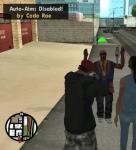
This script disables the auto-aim feature when using a joypad in GTA San Andreas and enables the "green arrow" manual aim.

Version 2.0

v2.0 allows you to enable/disable auto-aim while in-game by pressing Alt+Z

How to use:

1) Place the 'NoAutoAim.cs' file into your 'CLEO' folder.
2) Place the 'CLEO_TEXT\NOAAIMTEXT.fxt' file & folder into your 'CLEO' folder.
3) Press Alt+Z while in-game to enable/disable auto-aim.

Step 2 requires GxtHook.cleo plugin to be located in your CLEO folder.
Don't worry if it isn't this will not affect the operation of this script.


Version 1.0

v1.0 - Auto-Aim is always disabled. To enable/disable while in-game download v2.0

How to use:

1) Place the 'NoAutoAim.cs' file into your 'CLEO' folder.
2) Play GTA:SA


Enjoy!

If you find any bugs please post a reply and I'll try my best to resolve it.





 (11 votes)