logo
signbit
bit
nav_l nav_r
Speedometer Mod
for San Andreas US/EU v1.0
Information Files
Author: Spooky


Website: http://www.gtagarage.com/
Works with: GTA San Andreas 
Release/Version: 1.1
Status: Complete
Started on: 21 Jun 2005
Last Updated: 01 Jan 2006
Views: 755644
Type: Created from scratch
Rating: 3.75 (84 votes)
Please log in to rate this mod
Description
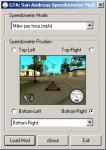
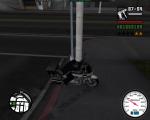
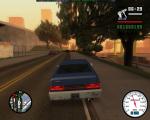
GTA: San Andreas Speedometer Mod

 by spookie


 This mod now comes in two versions.

 PROXY DLL VERSION:
 This version requires a file named d3d9.dll to be
 put in your GTA San Andreas root directory.
 See the included ReadMe.txt file for more info!

 DIRECT HOOK VERSION:
 This version directly hooks the required DirectX
 methods. Some users reported problems with this
 method, so if it doesn't work, try the above
 proxy dll version.


 Credits:

 Coded by spookie

 Thanks to EliCZ for EliRT!


 Notes:

 This mod is exclusive to GTANet (www.gtanet.com),
 but feel free to link to this mod via GTAGarage.


 Changelog:

 1.1 Proxy, 23/06/05
 Added additional release using a proxy dll method
 of hooking directx.

 1.1 BETA, 22/06/05
 Changed hooking method so Securom doesn't bitch!

 1.0 BETA, 21/06/05
 Initial release


 Visit:

 www.sa-mp.com
 www.gtagarage.com
 www.gtaforums.com
 www.planetgta.com


 Salutations:

 illspirit, kyeman, Tank, Jevon,
 [sheep], apache, Whitey, toker,
 w0!, loopnz, jax, mike, XcR,
 Luke, ModelingMan, Cam, Jordan,
 Kryptos, Squiddy, adamcs, CyQ,
 REspawn, steve-m, Delfi, Opius,
 Stilton, Dan, Racer_S, neop,
 ashdexx, jA, Hammer83, Patrick
Comments News
rawr1 commented a month ago:
how do you install De god damn thing :furious: :devil: :sui:
Nikeshox_jade commented a month ago:
how to uninstall? coz i found thisawesome speedometer mod and i want it to replace this speedometer... what do i do? :)
Stezzle commented 3 months ago:
Man thanks very very very much I wos searching for this mod I use dll mode it works and it's awsome take some 5/5 :cookie: :cookie: :cookie: :cookie: :cookie:
LeonidGTA commented 3 months ago:
It does not show up.Why? :( Can you help me? :r*:
rondivu commented 3 months ago:
So$trYk3 - hey if you get that error message... about directx driver, I had that too. What I had to do was reinstall the proper directx drivers from Microsoft... and if its dx 9 reliant, it may not be compatible with anything higher (direct x 10+). Apparantly, even when I clicked on the installation of directx 9c from the game cd, it says all my drivers were up to date... but after reinstallation it might work for you (choose the user download that replaces files needed, not the dev package, and it will replace missing or incomplete files - the first option i believe).
DeadlyCJ commented 4 months ago:
Works Great Thanks :r*:
So$trYk3 commented 4 months ago:
none of them work for me :/ if I try the .dll one, when I try to enter the game it says I need to have DirectX 9.0 installed, but I already have it. The other one, I set the settings and then I click "Load". It enters the game, but I don't see any speedometer when I enter a car. Help?
SeanJohn! commented 4 months ago:
You need to make a top middle and a bottom middle selection
fintelligent commented 5 months ago:
Why it says "unable to execute" when i click "load mod"? !?
d-rave_shizzle commented 6 months ago:
its working fine for me thanks :colgate: :colgate: :colgate:
View All Comments | Add Comment
New Update
If you downloaded the original Speedometer (v1.0 beta), and the speedometer didn't show up in-game, make sure you get the new updated version!

Due to the Securom protection on GTA:SA being a bitch, I've changed the hooking method. This should clear up the problems a few people have had.

View All Updates
1 users viewing this mod (1 guest)
bit
brick bit ?E?E bit bit
bit bit   bit bit