Spark Yet another Img Editor for GTA:SA


Introduction


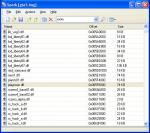
Welcome to Spark. Spark is an Img archive editor for GTA San Andreas.

This version of Spark is a BETA version and may have bugs that may
not in present in a fully functional release version. Please be aware
of this fact and make sure that you have backups of all files you
edit with Spark.


Requirements


Microsoft .NET Framework 1.1

 If you get the error:
 "The applcation failed to initialize properly (0xc0000135)."
 This means that you don't have the .NET Framework installed properly,
 and you need to download the following file.

 Ways to get it:
 - Windows Update (http://www.windowsupdate.com)
 - Direct Download:
 http://www.microsoft.com/downloads/details.aspx?FamilyId=262D25E3-F589-4842-8157-034D1E7CF3A3&displaylang=en


Features


Version: 0.9.2018

- Made adding/removing files in Explorer view faster

- Spark Console (SparkCS.exe)

- Saves last used view and last path file was opened from

Version: 0.9.2002

- Sort by file type

- "Arrange Icons By" menu in the View menu

- New "Explorer" view for previewing files inside archives

- Explorer preview support for San Andreas TXD files

- File association support (Manual association required)

Version: 0.9.2000

- User friendly interface

- Open, save, and create new IMG archives for GTA San Andreas
 (older version of the IMG format from GTA3 and Vice City are not
 supported currently)

- Sort files by name, offset or size.

- View files in a detailed view, list view or iconic view
 (Note: Iconic view might be slow for large files such as gta3.img)

- Search for files in archive directly from the toolbar.

- Automatically reuses space left over from previously deleted files
 reducing the need to rebuild archives.

- Maintians the layout state of the archive in memory allowing you
 to add/remove/delete files without committing directly to disk.
 Nothing is saved until you say you want it to be saved!

- Drag and drop support from and to Explorer, and any other program
 that supports drag and drop of files.

- Some limits to prevent accidental drag and drop of the all the files
 in the archive.





 (88 votes)